Uploading An Image on Antique Jewelry Investor
Uploading an image of your jewelry and jewelry marks simplified using image upload on Antique Jewelry Investor at the Help Central Forums and The Jewelry Exchange.
The Image Upload Button
Makes Uploading an Image Easy
Even if you have never held a camera in your hand, the following steps will guide you on how to upload an image on Antique Jewelry Investor. (Up to 4 Pictures can be uploaded in the one Submission).
1. First, name your question in the first - "name your question" box.
2. Type in the main question about the jewelry or hallmark in the second bigger box.
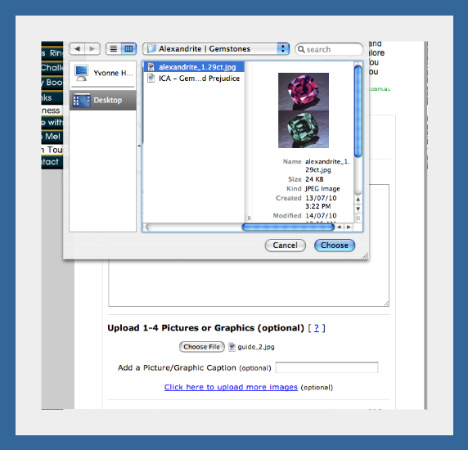
3. Upload image or images (up to 4) of the item or marks. Simply hit the image upload button that says, "choose file" this means "image" or "picture".
Some visitors get confused when they see the word "file" but it just means the same thing as "image" or "photo".
In the above example, I selected a file (image) from my desktop. The file is a jpg file - the file name is called 'alexandrite.jpg', but there are other file extensions, like .png extension, so don't worry if the extension does not say .jpg. It will still work.
Once you've chosen a picture, select another one and so-on, (if you have more than one picture to upload, that is).
When you're done image uploading, then press the "submit" button, and that's all there is to it - your question and pictures are on their way to us!
We all know the sinking feeling you get when you've gone to all the trouble of taking great images, then uploading them to your computer only to find they are too large :-( Use photo editing software to crop or resize the image.
I have used FotoFlexer to edit many of my images and it was a simple straightforward process. FotoFlexer Image resize is very handy. People say it is the most advanced online photo editor out there and it's 100% free at time of writing! Tinypic is a photo and video sharing service that allows you to easily upload, link and share your images and videos on MySpace, eBay, and blogs.
It's simplicity, and "user-friendliness" are one of the reasons that the forums at Help Central are so popular with visitors. "How to Take Great Pictures to Sell Merchandise", is another very useful link for beginner photographers. The link can also be found with other great resource tools and links in the Jewelry Resources.
Return to the top of Uploading an Image
Return to Antique Jewelry Investor Questions
Return to Antique Jewelry Investor Home Page
